Syve reads your email and tells you what actually matters.
Wake up to a short plan instead of a full inbox. You get your mornings back, and you stop missing the messages that move your business.
Free for 14 days · No card to start · Cancel any time
Your day is being spent by other people.
Hundreds of messages a day, and only a handful of them deserve you.
Recurring slots that nobody would defend if you asked them to.
The day gets spent on other people's priorities, not yours.
You should not have to read 200 emails to find the 5 that matter.
Syve does the reading. You make the calls. Every night it goes through your mail and your calendar, works out what advances your goals, and has a short plan waiting when you wake up. Nothing is sent, declined, or deleted without you.
Three steps to a calmer morning
Connect your mailbox
Outlook, Microsoft 365, or Gmail. One click, read-only, under a minute.
Tell Syve what matters
Drop in your goals, an OKR sheet, or just a memo. Or skip it and let Syve learn from your sent mail.
Wake up to your plan
A short morning list: what to answer, what to decline, what can wait.
This is what lands in your morning.
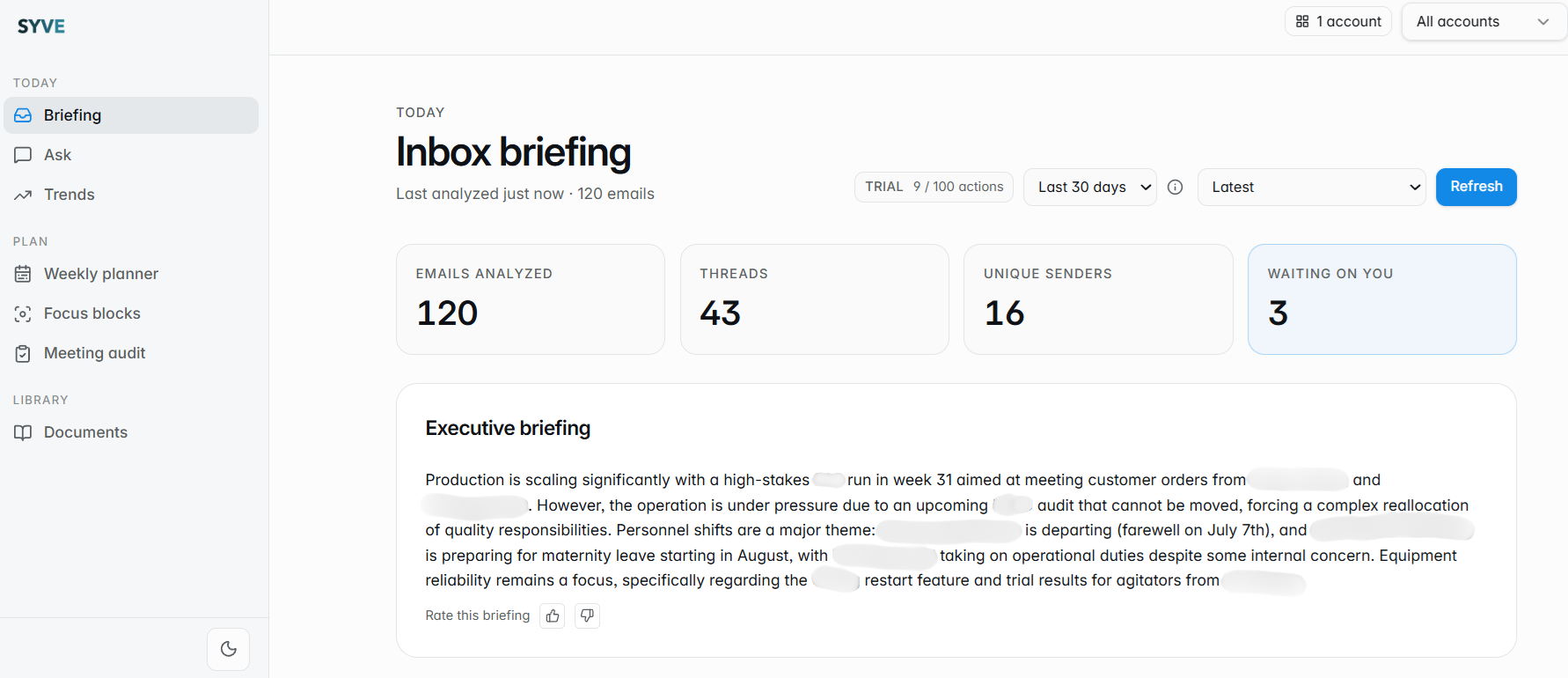
A real morning plan from an operations manager. Yours is built from your own mailbox during the free trial.
Know what to answer before you open your laptop
A short morning list of the threads that actually need you today, each with a one-line reason.
Reply in minutes, not hours
Drafts are already written in your voice. Read, adjust, send.
Get an hour back from your calendar
Meetings that earn nothing are flagged, with a polite decline ready to go.
End the day knowing nothing slipped
An evening recap tells you what you handled, what is still open, and your top three for tomorrow.
Two versions of tomorrow.
- · You open the inbox and start sorting.
- · Something important is buried three days deep.
- · Six meetings, four of them optional.
- · Your own work starts at 7pm.
- · You open a five-item plan.
- · The important thread is at the top, reply drafted.
- · Two meetings declined before breakfast.
- · Your own work starts at 9am.
Who this is for
Spend the day on the two things that move the company, not on inbox archaeology.
Nothing from your board, your team, or your biggest customer slips past you.
Client mail and personal mail stay separate, and both get planned together.
Founder updates and deal threads surface first, everything else waits.
Protect long blocks of deep work, and still catch the one thread that blocks the build.
Delays, shortages and supplier escalations surface first, before they turn into a stockout.
You want to do the work that actually moves the needle, not spend the morning digging through a full inbox to find it.
Less than one wasted meeting a month.
Free for 14 days. No counters, no per-action fees, cancel any time.
One mailbox, and your mornings back.
- · Your last 14 days of email
- · Weekly recap
- · Drafted replies and meeting audit
- · One mailbox
A plan every morning, a recap every evening.
- · Your last 30 days of email
- · Daily morning plan and evening recap
- · Work and personal mailboxes
- · Everything in Starter
For people whose calendar is the bottleneck.
- · Your last 90 days of email
- · Quarterly trends
- · Coaching signals for your team
- · Priority support
Nothing is charged until day 15. Cancel before then and you pay nothing.
Local prices are estimates — you'll be billed in EUR.
Questions people ask
Will Syve send anything without me?
No. Syve reads, ranks, and drafts. You decide what gets sent, declined, or deleted.
Which email do you work with?
Outlook.com, Microsoft 365, and Gmail, plus Outlook Calendar and Google Calendar. You can connect a work and a personal account side by side.
What do you do with my email?
Read it to build your plan. That is all. It is never shared, sold, or used to train shared models, and only you can see your account's data.
Do I have to upload goals?
No. Without them Syve learns from your sent mail and calendar. With them, every item on your plan says which goal it moves.
How long until it works?
Your first plan is ready a few minutes after you connect your mailbox.
Can I cancel?
Any time, from your account, in two clicks. Your data is removed on request.
Syve reads your email and tells you what actually matters.
Wake up to a short plan instead of a full inbox.
Free for 14 days · Cancel any time